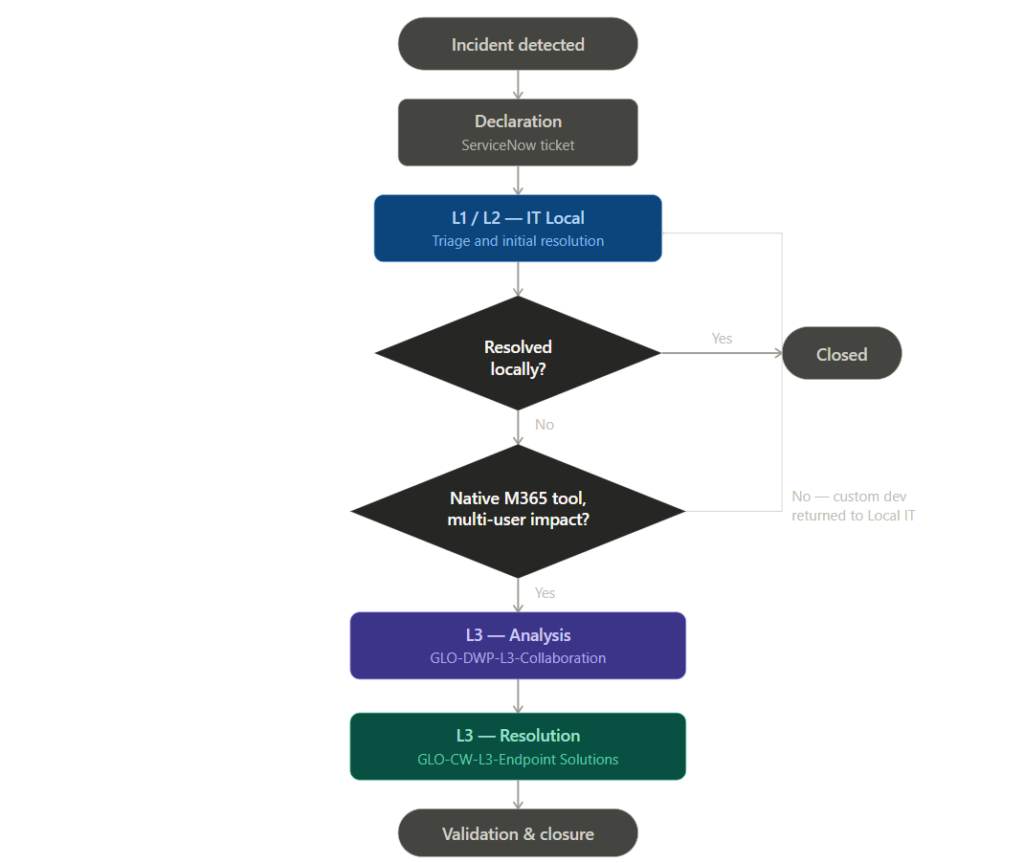
Incident Management Procedure — Microsoft 365 Collaboration Tools
1. Purpose
This procedure defines the process for managing incidents related to Microsoft 365 collaboration tools (Word, Excel, PowerPoint, Outlook, Teams, OneDrive, SharePoint, Access). It describes the escalation chain between support teams, the responsibilities at each level, and the criteria governing the transfer of tickets between teams.
2. Scope
This procedure applies to all incidents reported through the ServiceNow ticketing system concerning the Microsoft 365 suite. It covers incidents impacting one or more users within the organisation.
The following are excluded from the scope of this procedure:
service requests (handled through the service catalogue);
incidents related to user-specific custom developments (personal macros, local scripts);
infrastructure incidents falling under the responsibility of network or endpoint teams.
3. Terms and definitions
Term
Definition
Incident
Unplanned interruption or degradation of the quality of a service
L1 / L2 / L3
Support escalation tiers, from initial contact to specialised expertise
ServiceNow
Ticket management tool used as the single reference system for incidents
Root cause
Underlying origin of an incident, identified through analysis
4. Roles and responsibilities
Tier
Team
Responsibility
L1
IT Local
Initial point of contact, qualification, resolution of first-level incidents
L2
IT Local
Advanced technical investigation, resolution of incidents requiring local expertise
L3 — Analysis
GLO-DWP-L3-Collaboration
Root cause analysis of incidents affecting native Microsoft 365 tools with multi-user impact
L3 — Resolution
GLO-CW-L3-Endpoint Solutions
Implementation of corrective actions through dedicated remediation tools
5. Process description
5.1 Declaration
Every incident must be recorded in ServiceNow by the end user or by the support team that becomes aware of it. The ticket constitutes the sole reference for traceability throughout the incident lifecycle.
5.2 Initial handling (L1 / L2)
The IT Local teams perform initial handling. They qualify the incident, attempt resolution and, where applicable, escalate the ticket to the next tier.
5.3 Criteria for escalation to L3
Escalation to GLO-DWP-L3-Collaboration is subject to the following cumulative criteria:
the incident concerns a native Microsoft 365 tool;
the incident affects multiple users or exhibits a systemic character;
the incident could not be resolved at L1 and L2;
the presumed cause relates to a Microsoft update, a configuration change, or a malfunction of an internal tool.
5.4 Root cause analysis (L3 — Analysis)
GLO-DWP-L3-Collaboration performs the analysis, identifies the root cause, and documents the findings within the ticket.
5.5 Transfer to resolution (L3 — Resolution)
Following analysis, the ticket is reassigned to GLO-CW-L3-Endpoint Solutions, which holds the technical tooling required to implement the corrective action.
5.6 Return to Local IT
Where analysis establishes that the incident relates to a user-specific custom development (personal macro, non-standard local configuration), the ticket is returned to Local IT for handling, in accordance with the scope defined in Section 2.
5.7 Closure
The incident is closed once the resolution has been validated by the end user and the solution has been documented within the ticket.
6. Performance indicators (to be defined)
To be completed based on the organisation’s quality objectives. Recommended indicators: time to acknowledgement, time to resolution per tier, reassignment rate, recurring incident rate.